Infographics People Actually Read
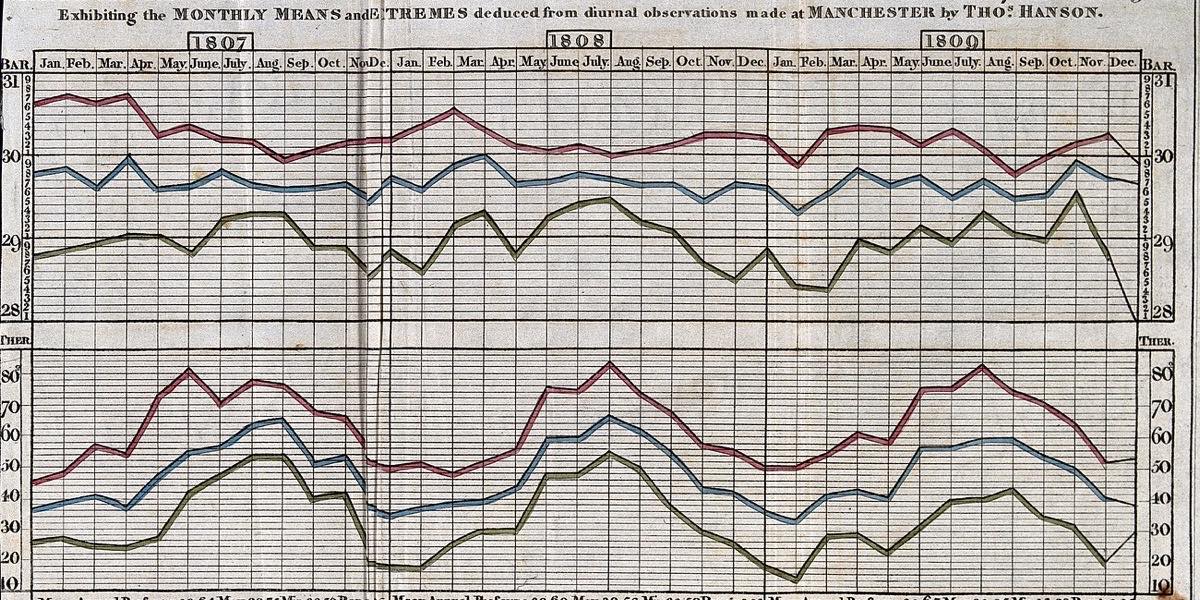
Most infographics fail for a simple reason: they try to show everything. A page crammed with icons, percentages, arrows and decorative illustrations looks busy and impressive at a glance, then gets scrolled past because nobody can work out what it is saying. An infographic people actually read does one job well. It takes a point that would be tedious in a paragraph and makes it obvious in a few seconds.
This guide covers how to get there: finding the story, choosing the right chart, cutting what does not help and arranging the page so the eye knows where to go.
Start with one sentence
Before opening any design software, write down the single sentence your infographic should leave in the reader's head. "Our customer complaints halved after we changed the returns process." "Most of the council's budget goes on three services." "Commuters in the town now cycle more than they drive." If you cannot write that sentence, you do not yet have an infographic, you have a spreadsheet.
That sentence becomes your headline, or something close to it. It also becomes the test for every element you add later. If a chart, icon or label does not support the sentence, it probably belongs somewhere else, such as a report appendix or a follow-up post.
Know where it will be seen
An infographic in a printed annual report is read at a desk with a cup of tea. One on social media is seen on a phone for a moment between other things. These are very different design problems.
- Social feeds: one idea, large type, a single chart at most. Assume the reader will not tap to enlarge it.
- Web pages and blogs: a longer vertical format can work, but break it into clear sections with headings so readers can scan and stop when they have what they need.
- Print and presentations: you can include more detail, but the main message should still be readable from across a room or in a quick flick through.
Choose the chart that matches the question
Every chart type answers a particular kind of question. Picking the wrong one is the most common reason a data graphic confuses people.
Comparing amounts
Use a bar chart. Bars are easy to compare because the eye judges length accurately. Horizontal bars are especially good when category names are long, because the labels can sit comfortably to the left. Sort the bars from largest to smallest unless there is a natural order, such as age groups.
Showing change over time
Use a line chart, with time running left to right. Keep the number of lines small; three or four is usually the limit before it becomes a tangle. If you need to show more, highlight the one that matters and grey out the rest.
Showing parts of a whole
Pie and doughnut charts are popular but only work with a handful of segments that differ noticeably in size. People are poor at comparing angles, so two slices of 23% and 27% look almost identical. A single stacked bar or a simple bar chart is often clearer. If you do use a pie, keep it to around five segments and label them directly.
Showing a relationship
A scatter plot shows whether two things move together. It is a little less familiar to general audiences, so add a short line of text explaining what to look for.
And sometimes the best chart is no chart. If the key point is a single figure, set that number large with a clear label. A huge "1 in 4" can say more than any graph.
Cut the clutter
Once you have a draft, go through it and remove anything that does not carry information. This is where most infographics improve dramatically.
- Delete 3D effects, shadows and gradients on charts. They distort the data and add nothing.
- Remove heavy gridlines, or lighten them until they are barely visible.
- Label data directly on or next to the chart instead of relying on a legend the reader has to cross-reference.
- Round numbers sensibly. 47.36% is rarely more useful than 47%.
- Use icons only where they help recognition, not as decoration in every corner.
White space is not wasted space. It separates ideas and gives the reader somewhere to rest. A slightly emptier page nearly always reads better than a full one.
Use colour with intent
Colour should highlight, not decorate. A useful approach is to make most of the chart a neutral grey and use one strong brand colour for the data point that matters. The reader's eye goes straight to it, which is exactly what you want.
Avoid relying on colour alone to tell categories apart. A noticeable share of people have some form of colour vision deficiency, and red and green are the classic problem pair. Combine colour with labels, patterns or position, and check that text on coloured backgrounds has enough contrast. Our guide to colour contrast and accessible design covers the practical checks.
Lead the eye
A good infographic has a reading order. In Western layouts readers generally start at the top left and work down, so put the headline and main point there. Then use size, colour and spacing to set a clear hierarchy: the headline is the biggest thing on the page, the key figure or chart comes next, and supporting detail is smaller and quieter.
Numbered steps, a clear vertical flow or a simple left-to-right sequence all help. What does not help is a scattering of equally sized boxes with no obvious starting point.
Write the words properly
Infographics are often treated as purely visual, but the text does a lot of the work. A headline that states the finding ("Complaints halved in a year") is much stronger than a label that just names the topic ("Complaints data 2025"). Keep annotations short and specific, and say what the reader should notice rather than describing what they can already see. The same principles apply as in any layout where copy and design are planned together.
Always include the source of your data and the date, in small type at the bottom. It builds trust and lets anyone check your figures.
Test it on a real person
Show the draft to someone who has not seen it before, give them ten seconds, then take it away and ask what it said. If they repeat your one sentence, it works. If they describe the colours or say "something about budgets", go back and simplify.